What LUFS should I master to for Spotify, Apple Music and YouTube?
By Conor · 2 November 2026 · 7 min read
It's one of the most searched questions in mastering, and the honest answer is less exciting than a single magic number. Each service has a playback loudness it turns tracks towards, and knowing those numbers is useful. But they're not targets you have to hit, and chasing one usually makes a master worse rather than better.
This guide gives you the numbers, explains what each service actually does with them, and then covers how I'd decide how loud to make a master.
Quick disclosure: I make a plugin, Stream AB, that A/Bs your mix against whatever is playing on your computer and, in the full version, measures the loudness of both. I'll mention it where it fits, but nothing here depends on it.
The short answer
These are the approximate playback levels the big services normalise to, measured in integrated LUFS:
- Spotify: about −14 LUFS on the default "Normal" setting. Listeners can also choose "Loud" (about −11) or "Quiet" (about −19).
- Apple Music: about −16 LUFS, when Sound Check is switched on.
- YouTube: about −14 LUFS.
Services adjust these details from time to time and don't always announce it, so treat the numbers as approximate and check the service's own documentation if you need the current figure.
The important part is what follows from them: if your master is louder than the service's level, it gets turned down to match. A master at −8 LUFS doesn't play 6 dB louder than everything else on Spotify. It plays at about the same level as everything else, just with less dynamic range than the tracks around it.
What each service actually does
Spotify
With Normalize volume on, which is the default for most listeners, Spotify measures each track and adjusts its playback level towards the chosen setting. Loud tracks are turned down. Quieter tracks are turned up, but only as far as their peaks allow, so a very dynamic, quiet master can still end up playing a little under the others.
When someone plays a whole album, Spotify can normalise the album as a unit rather than track by track, so a quiet interlude stays quieter than the single next to it. Spotify's own advice for masters is to keep true peak at or below −1 dBTP, or around −2 dBTP if the master is louder than −14 LUFS, because loud masters are more likely to clip when they're encoded and decoded.
There's more on how this changes what you hear in why your mix sounds different on Spotify.
Apple Music
Apple's version is called Sound Check. When it's on, tracks play at roughly the same loudness, around −16 LUFS. Whether it's on by default, and where you find the switch, depends on the device and the version of the app, so check your own settings rather than assuming.
YouTube
YouTube turns loud uploads down towards about −14 LUFS. As far as I know, it doesn't turn quiet uploads up, so a master well below −14 LUFS will simply play quieter than most of what's around it.
On desktop you can see this happening: right-click a video and open "Stats for nerds", and look for the volume or "content loudness" line. If the video has been turned down, it shows there. The exact wording has changed over the years, so it may look slightly different for you.
Do you need a different master for each service?
For almost everyone, no.
Because every service turns loud masters down, there's no reward for making one master louder for Spotify and another for YouTube. What would change between versions is how much limiting each one has, and after normalisation those differences are mostly heard as one sounding more squashed than the other, not louder.
Most distributors also expect one file per track for every store. One well-made master, with sensible true-peak headroom, is the practical answer. If you're working with a mastering engineer who offers different versions for different uses, that's their call, but you don't need them for streaming.
So how loud should you master?
Here's how I'd think about it instead of picking a number from a list.
1. Master for the music
A sparse acoustic track, a jazz recording and a club track should not be the same loudness. The right level is the one where the track still has the punch and movement it needs, with the density your genre expects. Modern pop, EDM, hip-hop and rock are often mastered well above −14 LUFS, and that's a stylistic choice, not a mistake. They'll be turned down on streaming, and that's fine as long as they still sound good when they are.
2. Don't go far below −14 without a reason
On Spotify a quiet master may not be turned all the way up, and on YouTube it won't be turned up at all. If your track is much quieter than −14 LUFS, it will play quieter than its neighbours. That's fine for intentionally dynamic music, but don't do it by accident.
3. Leave true-peak headroom
Whatever loudness you settle on, keep true peak at −1 dBTP or lower, and give loud masters a bit more room. If your limiter has a true-peak mode, use it.
4. Judge it the way listeners will hear it
This is the step that actually tells you whether your loudness choice works. Turn your master down to the level a service would play it at, put a released track in your genre next to it at the same level, and switch between them.
If yours sounds flatter and smaller at the same loudness, you've probably limited it harder than it needed. If it holds up, you're done, whatever the meter says. The level-matching guide goes through how to do that fairly, and referencing against Spotify covers how to get the streamed track playing next to your session.
Doing the comparison with Stream AB
Stream AB sits on your master. One button mutes your mix and plays whatever is in Spotify, Apple Music, a YouTube tab or anything else on your computer, and the same button switches back. With normalisation on in the streaming app, the reference plays at roughly the level that service would play it, so you're already hearing it the way listeners do.
In the free version you then drag the gain trim down until your master and the reference sound equally loud. The trim only moves your signal, never the reference, and it's a normal plugin parameter, so it's saved with the project.
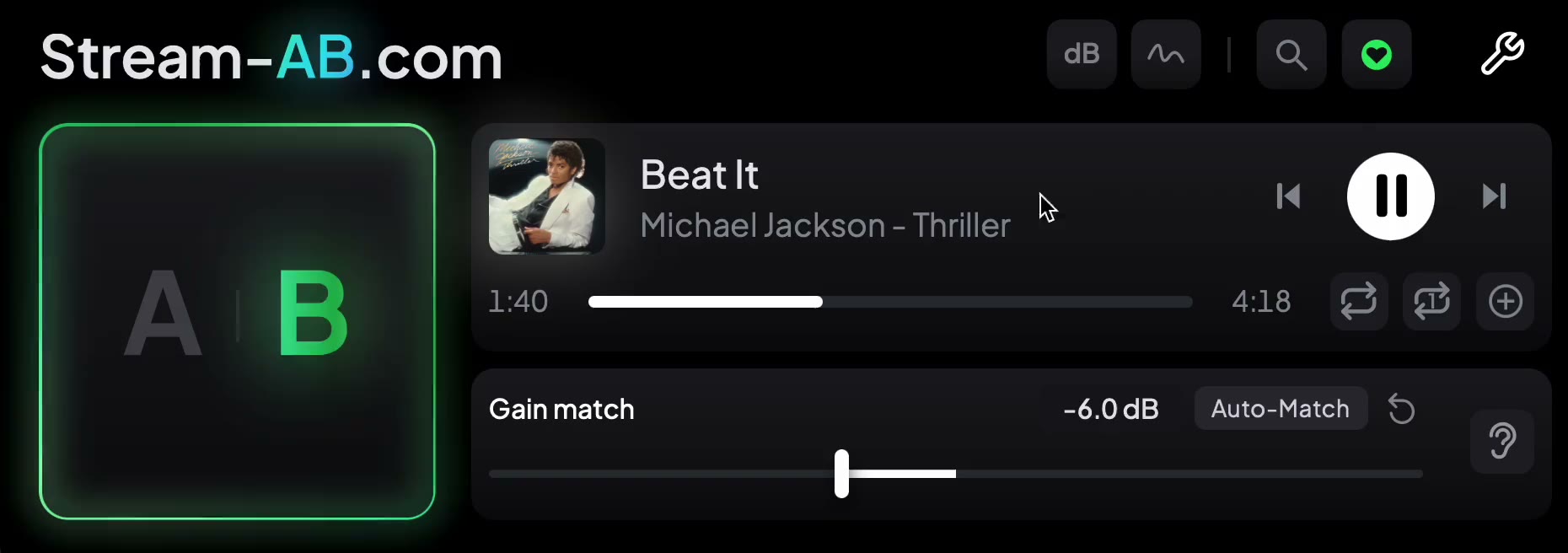 B selected, so the reference is playing, with the gain trim set to -6.0 dB.
With the streaming app's own volume at maximum, how far you had to pull your master down is a rough guide to how much the service will turn it down too.
The full version adds Auto gain match, which listens to both sides and sets the trim for you, and loudness analysis for both A and B: integrated, short-term and momentary LUFS, true peak and loudness range. Your mix is measured before the gain trim, so the reading is your master's real level, not the trimmed one. One thing to know: with normalisation on, the reference's readings reflect the turned-down playback, not how loud it was mastered. Switch normalisation off in the app if you want to see the master's own level. How it works has the detail.
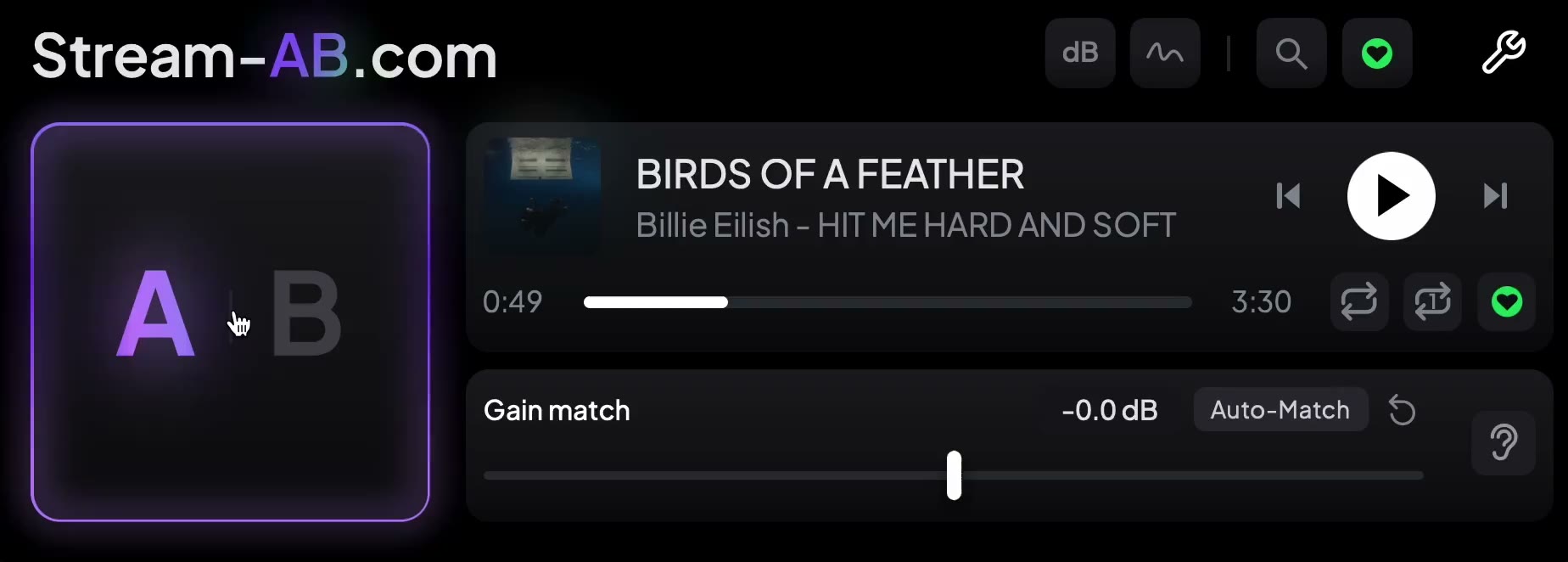 The A/B switch, a reference loaded, the gain match slider at 0.0 dB and the Auto-Match button.
The full version's streaming codec preview is useful for checking how the top end survives encoding, but it previews codec quality only, not a service's loudness, so it won't turn your master down for you.
Common mistakes
Mastering to −14 because a blog said so
−14 LUFS is a playback level, not a quality standard. A dense rock master pulled back to −14 can sound limp, and that's not what the number is for.
Measuring a section instead of the whole song
Services normalise on integrated loudness over the whole track (or album). Your chorus reading tells you how loud the chorus is, not where the service will set the track. Measure the full master from start to finish.
Forgetting the listener's settings
Normalisation can be switched off, and some listeners will hear your master at full level. That's another reason to make a master that sounds good both turned down and at its own level, rather than one optimised for a single setting.
A quick checklist
- Integrated LUFS measured over the whole master
- Not far below −14 LUFS unless the music wants it
- True peak at −1 dBTP or lower, with more room on loud masters
- Compared, level-matched, against released tracks in your genre at streaming playback level
- Limiting backed off if your master sounds smaller than the references at the same loudness
- One master for every service
The number on the meter matters less than how the track sounds once every service has had its say on the volume.