Why does my mix sound different on Spotify than in my DAW?
By Conor · 27 October 2026 · 7 min read
You finish a mix, it sounds great in the studio, you release it, and then you hear it on Spotify. It's quieter than the track before it. The top end feels a bit softer. The punch you were proud of seems to have gone somewhere.
It's a horrible feeling, but it's rarely Spotify "ruining" your mix. There are a handful of specific reasons, most of them predictable, and you can check almost all of them before you release anything.
Quick disclosure: I make a plugin, Stream AB, that A/Bs your DAW against whatever is playing on your computer, Spotify included. I'll mention it where it helps, but everything here works without it.
1. Spotify changes the volume of your track
This is the big one. With Normalize volume switched on, which it is by default for most listeners, Spotify plays every track at roughly the same loudness. On the default "Normal" level that's about −14 LUFS integrated. There are also "Loud" and "Quiet" options, about −11 and −19 LUFS, and where you find the setting depends on your device and app version.
So if you mastered to −8 LUFS, Spotify turns your track down by around 6 dB. A quieter master gets turned up, but only as far as its peaks allow, so a very dynamic track can still end up playing a little below the others.
Being turned down isn't a problem in itself. The problem is what happens to a heavily limited master when it's turned down to the same loudness as everything else. All the density you added to make it loud no longer buys you any volume, and what's left is a track with flattened transients next to tracks that kept theirs. That's why a mix that sounded huge in your DAW can sound small and tired on Spotify: it's being compared fairly for the first time.
A few things follow from that:
- Pushing your master louder won't make it louder on Spotify for most listeners. It just gets turned down further.
- Measure integrated LUFS on your final master so you know roughly how much Spotify will move it. Any loudness meter that follows ITU-R BS.1770 will do.
- Spotify can normalise whole albums rather than single tracks when someone plays an album through, so quiet songs stay quieter than loud ones as intended. Don't panic if one track on your EP sits lower than another in album playback.
2. The codec takes something away
Unless the listener is on a lossless tier, Spotify streams a lossy encoded version of your track, not the WAV you uploaded. At the highest settings it's very good, but it isn't transparent on everything. The things that tend to suffer are:
- Very bright, busy top end: dense cymbals, noisy synths and heavy saturation can come out slightly smeared or swirly.
- Sharp transients: a hard, clicky attack can soften a little.
- Very wide stereo content: lots of out-of-phase or side information is harder to encode cleanly than a solid centre.
Encoding can also push the peaks of a loud master above 0 dBFS when it's decoded, which shows up as clipping or crunch you never heard in the studio. That's why Spotify's own advice is to keep true peak at or below −1 dBTP, and lower (around −2 dBTP) if your master is louder than −14 LUFS. If you only look at sample peaks, check that your limiter has a true-peak mode and that it's on.
Many listeners will also be on lower quality settings than you, especially on mobile data. You can't control that, so it's worth knowing how your mix holds up when it isn't perfect.
3. You're listening on something else
In the studio you hear your mix through your monitors or headphones, at your usual level, in your room. Then you check the release on a phone, earbuds, a laptop or the car. Those all have their own frequency response, and almost all of them lose the bottom octave. If the bass in your mix lives mainly below 60 Hz, it will seem to vanish on small speakers.
Volume matters too. We hear less low end and top end at lower levels, so if Spotify on your phone is quieter than your monitors were, the mix will sound thinner and duller even if nothing has changed. Compare at the same volume, on the same speakers, before deciding something is wrong.
Also check the listener's side of things: Spotify's own equaliser, a phone's sound settings or a speaker's "enhancement" mode will all change what you hear.
4. You're hearing it next to finished records
In your DAW, your mix plays on its own and your ears adapt to it over hours. On Spotify it plays straight after other people's finished masters. Any difference in low end, vocal level or brightness that you'd stopped noticing is suddenly obvious.
This one isn't Spotify doing anything at all. It's referencing, just happening after release instead of before. The fix is to make that comparison while you can still change things, which is what referencing your mix against Spotify is about.
5. The file isn't the mix you think it is
Worth ruling out before blaming anything else:
- A monitoring plugin left on the master. Room or headphone correction, a metering chain with a gain stage in it, or anything you only meant for listening. Bounce with all of it bypassed.
- The wrong bounce. An older version, a pre-master, or a file exported with the wrong range or tail.
- Distributor conversion. Your distributor may convert your file to the format it needs. Upload the format it asks for so there's as little conversion as possible.
If you use Stream AB's streaming codec preview (full version), turn it off before you export. While it's on, your mix is encoded, so an export made with it on will be encoded too.
How to check before you release
You can hear most of this in your studio, before anything goes live:
- Measure the master. Note its integrated LUFS and true peak. If it's much louder than −14 LUFS, expect Spotify to turn it down, and ask yourself whether the extra limiting is buying you anything.
- Listen to it turned down. Match its level to a released track in your genre playing on Spotify, and switch between them. This is roughly what a listener will hear. If yours sounds flat and small next to the reference at the same loudness, ease off the limiter rather than adding more.
- Check the top end and stereo image through a codec, if you have a way to. Listen especially to cymbals, reverb tails and anything very wide.
- Check on small speakers at a normal listening volume.
For step 2, Stream AB does the switching for you. It sits on your master, one button mutes your mix and plays whatever is in Spotify, and the same button switches back. The free version gives you the switch and a manual gain trim, so you can turn your mix down until the two sound equally loud.
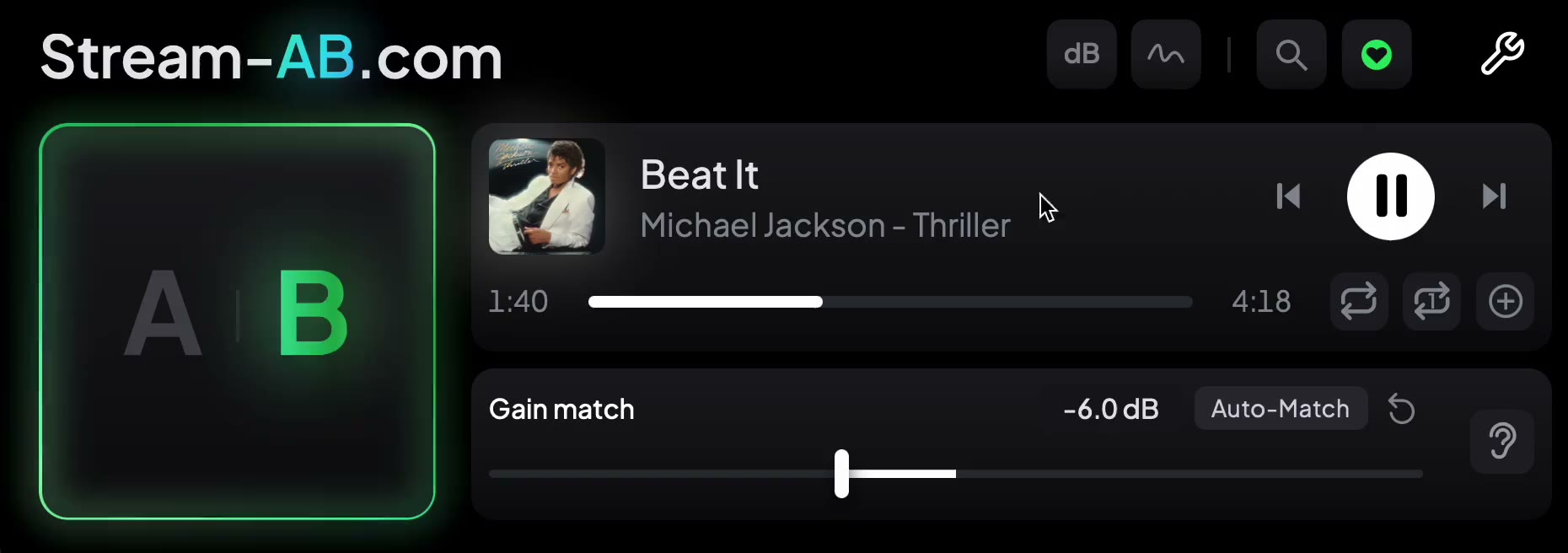 B selected, so the reference is playing, with the gain trim set to -6.0 dB.
The full version adds loudness analysis for both sides, integrated, short-term and momentary LUFS and true peak, so you can see how far apart the two are. It also has a streaming codec preview, so you can hear your mix through a streaming-quality codec before release. How it works has the details.
Once it's out
After release, you can do the same comparison the other way round: put your final bounce in the DAW and your released track playing in Spotify, level-match them, and switch. With normalisation on, the Spotify version will usually be quieter, so match the levels first. Once they're matched, any difference you can still hear is what the encoding and playback actually did, and it's usually smaller than you feared.
Before you upload
- Integrated LUFS measured, and you know roughly how much Spotify will turn it down
- True peak at −1 dBTP or lower, or around −2 dBTP for a master louder than −14 LUFS
- Compared, level-matched, against two or three released tracks on Spotify
- Top end and wide elements checked through a codec if you can
- Checked on small speakers at a normal volume
- Exported with every monitoring plugin, and any codec preview, switched off
Your mix will always sound a little different on Spotify. The aim is for it to sound different in the same way everyone else's does.