Reference anything
A/B your mix against whatever is already playing on your computer. Spotify, Apple Music, a YouTube tab. No files necessary, just stream and A/B.
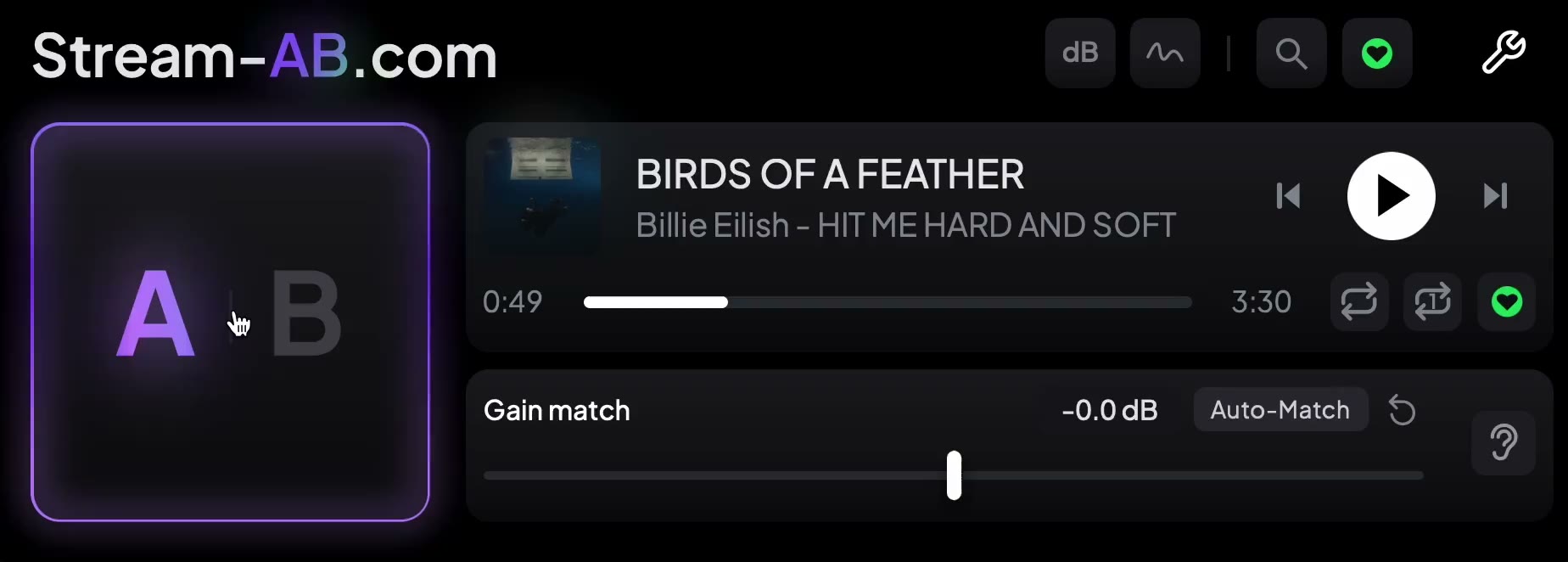
VST / AU / AAX · macOS and Windows · 2 machines per licence
Free and full
| Feature comparison | Free $0 | Full $25 |
|---|---|---|
Put Stream AB on your master and hit B: your mix mutes and the reference plays. Hit A and your mix is back. Learn more | ||
Control the reference from inside the plugin. With B selected, Space plays and pauses it too, and switching between A and B starts and stops it for you. Learn more | ||
A gain trim on your mix, so the two sit at the same level and you judge the sound rather than the volume. Learn more | ||
A/B is a real plugin parameter, so map it to a MIDI controller or a key and switch without touching the mouse. Learn more | ||
| – | ||
Momentary, short-term and integrated LUFS for your mix and the reference, measured the same way, with peaks and range alongside. Learn more | ||
| – | ||
Your mix and the reference on one plot, as a fine curve or four broad bands, so you can see exactly where your frequency balance differs. Learn more | ||
| – | ||
Hear your mix through a streaming-quality codec, chosen from a dropdown, and catch what compression does to it before you release. Learn more | ||
| – | ||
Find a song and it starts playing, without leaving your DAW. Click the service logo to switch services. Spotify needs no Premium. Learn more | ||
| – | ||
One button listens to both sides for a few seconds and sets your gain to match the reference. Learn more | ||
| – | ||
Loop the part you are working on - drag across the scrub bar or type exact times - or loop the whole song so the reference keeps playing. Learn more | ||
| – | ||
Heart a search result, or press Save while a track plays, and your go-to references are one click away. Learn more | ||
| – | ||
Jump to any point in the reference from the scrub bar, and skip between tracks. | ||
| – | ||
Title, artist and artwork for whatever is playing. | ||
New in v2.0.0
A new design, one A/B button
A redesigned interface, and A/B is now a single button that toggles, so you can switch faster without moving the mouse between two.
Search more services
Apple Music, YouTube and TIDAL join Spotify. Click the service logo to switch between them.
Saved references
Heart a result, or press Save while a track plays, and your go-to references are one click away.
Full-song loop
Loop the whole track, alongside the section loop, so a reference keeps playing while you work.
Streaming codec preview
Hear your mix through a streaming-quality codec before you release it, and catch what compression does to it.
Plus a far more detailed loudness panel and a rebuilt auto gain match that is much more reliable and accurate - both covered in See the detail. And in case you missed it: native Pro Tools AAX is tested and working on macOS, and now included on Windows too (not yet tested in Pro Tools on Windows, but it should work fine). Everything is on the changelog.
What it does
Normally, referencing means finding the track, importing it, lining it up and level-matching it by hand.
Stream AB uses what you are already listening to. Put it on your master, hit B: your mix mutes and the reference plays. Hit A and your mix is back. It never touches your audio - it mutes, unmutes, and applies a gain trim so the two are level-matched.
The full version also searches Spotify, Apple Music, YouTube and TIDAL from inside the plugin, shows what is playing, saves your favourite references, and measures both sides so you can compare with numbers as well as by ear.
A/B is a real plugin parameter, so you can map it to a MIDI controller or keybind and switch without touching the mouse.
The detail is on the how it works page.
See the detail
Full versionThe full version measures your mix and the reference the same way, side by side, so you can see what you're hearing.
Loudness analysis
Integrated, short-term and momentary LUFS, true peak and loudness range, for A and B. Pause or reset either side.
Tonal balance
See where your mix is brighter, darker or heavier than the reference, as a detailed curve or four broad bands. Hover to read the frequency.
Auto gain matching
One press listens to both and levels your mix to the reference, so you judge the sound, not the volume.
More on how the measurement works.
Compatibility
macOS
- macOS 13 or later
- Intel and Apple silicon
- AU, VST3 and native AAX
- Tested in Pro Tools, Logic Pro, Ableton Live, FL Studio, Cubase, Reaper, GarageBand
Windows
- Windows 10 (1809) or later, 64-bit
- VST3 and native AAX (AAX not yet tested in Pro Tools)
- Tested in FL Studio, Ableton Live, Reason, Cubase, Reaper
Any DAW that loads VST3 or AU should work. Pro Tools also supports Stream AB natively via AAX: tested on macOS, and included but not yet tested on Windows. The DAWs listed above are those tested. Search opens results in the service’s desktop app, or your browser for YouTube; activating a licence needs an internet connection. The free version needs neither.
A note on macOS: showing what is playing and measuring the reference both depend on things Apple controls, and Apple has restricted them before. If a macOS update closes them, you lose the track display or the reference’s meters - never the A/B switching. The detail.
Hope you enjoy it
Stream AB takes the friction out of referencing. Any problems, email me - it goes straight to a person.